China Payment Apps: A Hands-On TenPayGo Walkthrough for Visitors Arriving in China

If you are flying to the Chinese mainland next month and your only question about China payment apps is what to install and how to get it working, this is the page for you. You need four things: an email address you can read on your phone, a payment card or wallet issued outside the Chinese mainland, a working data connection, and twenty minutes before you fly. No Chinese bank account, no Chinese phone number, and no passport upload at the basic setup stage. The rest of this guide walks the screen sequence in order, tells you what each screen asks for, and covers what to do when a step refuses to cooperate.
The app at the centre of it is TenPayGo, one of the China payment apps aimed specifically at visitors, released by the Weixin Pay team on 24 September 2026 and built for short-stay overseas visitors. It registers with an email address rather than a phone number, which removes the obstacle that stops most first-time visitors on the first screen of every other wallet. It works at merchants already on the Weixin Pay network - restaurants, supermarkets, taxis, hotels, attractions - and it does nothing else: no chat, no timeline, no ride-hailing, which is the misunderstanding people bring to China payment apps most often. Think of it as a payment instrument with a translation toolkit attached, not as a social app.
Two promises and one disclaimer about China payment apps, up front. This is an operational guide: each section maps to a screen you will actually see, and the sequence below is the sequence in the current build. Nothing here is financial advice, and no one can guarantee that a given counter accepts a given method at a given hour - the practical defence against that is setting up two independent methods at home rather than one at the airport. Fees, limits and eligibility are set by the app, the card networks and your own issuing bank, and they change; read the figure on the screen before you approve it.
1. Before You Start: The Twenty-Minute Setup Checklist
Get five items together before you open the app store for any of the China payment apps, because every failed setup traces back to one of them missing. First, an email inbox you can open on the same phone - the verification code arrives there and it expires. Second, the physical card you intend to bind, or the Apple Pay wallet already loaded on the device. Third, whatever your bank uses for verification: a phone that receives its SMS codes, or its own banking app for a push approval. Fourth, wifi you control. Fifth, your issuer's international helpline written down, because binding failures are bank-side far more often than app-side.
The eligibility line for these China payment apps is simple and worth stating before you start typing: TenPayGo takes payment methods issued outside the Chinese mainland. Cards on the UnionPay, Visa, Mastercard, American Express, JCB, Diners Club and Discover networks are supported, alongside Apple Pay and a list of partner overseas wallets shown inside the app. A card issued inside the Chinese mainland will not bind, and there is no stored balance to top up in advance - every payment draws from whichever method you attached.
One habit separates visitors who never think about China payment apps again from visitors who spend their first morning troubleshooting: do the whole setup at home, on your own wifi, at least two weeks before departure. Registration is email-based, but card binding hands you to your issuer, and an issuer that flags an unusual overseas authorisation may take days to clear. Doing it early converts a possible trip-stopper into a five-minute phone call from your kitchen. It is a modest piece of foresight, and it is exactly the sort of thing a human-designed travel briefing handles for you before you pack.
Have this ready | Why it matters | What breaks without it |
An email inbox open on your phone | The verification code is emailed, not texted | Registration stalls at screen two. |
A card or wallet issued abroad, not on the mainland | Mainland-issued cards are not accepted | Binding fails at screen three. |
Access to your bank's verification method | Issuers use SMS codes, app pushes or 3-D Secure | Card is added but never verified. |
Wifi you control | China payment apps need stable data for setup and the first handshake | Half-configured app at the departure gate. |
Your issuer's international helpline | Declines are usually issuer-side | No route to unblock the first payment. |
Decide now whether TenPayGo will be your only method. For a stay of up to two weeks with a fixed itinerary it can be, provided a second card sits behind it. For anything longer, or if you want ride-hailing and delivery inside the WeChat ecosystem, plan to set up a WeChat account with your foreign card bound as well - that route needs a phone number, which is why it is normally done after buying a local SIM rather than before departure. Settling that sequence before you fly is precisely what a planner working in human-designed travel does on your behalf, which is why Kiki Holidays walks clients through it during planning rather than at the gate.
Ge Wen, who leads innovative product experience at Weixin Pay, put the design intent behind these China payment apps plainly at the launch briefing in September 2026: the app is built by the Weixin Pay team, a user registers with an email address alone, and it draws on the payment technology, risk control and compliance experience the team already runs. His summary for travellers was that the point is to pay easily and get on with the trip. Everything below follows from that intent - a short setup, then out of the way.
2. Step One: Install the App and Confirm It Is the Official One
Open the App Store or Google Play on your own account and search TenPayGo - the ordinary route for China payment apps aimed at incoming visitors. The listing you want publishes under the seller name Tencent Technology (Shenzhen) Company Limited; on iPhone the address is https://apps.apple.com/us/app/tenpaygo/id6778755338, and the iOS listing showed version 1.1.2 in October 2026. The official website, https://tenpaygo.com, is the starting point for reaching the correct store page for your device. Google Play users should read the developer field before tapping install - that single check is what separates the real app from the lookalikes that exist in every payments category in every store.
Item | Official detail | Check |
Official website | Start here rather than from a search result. | |
Apple App Store | Listing id6778755338 | Seller must read Tencent Technology (Shenzhen) Company Limited. |
Google Play | Search TenPayGo | Match the developer name shown on listings of China payment apps. |
Current iOS version | 1.1.2 observed October 2026 | Read the update notes; figures change. |
Availability | Listed in more than 30 countries and regions | Install before you fly if your store carries it. |
Support mailbox | Save it before you travel. |
Install China payment apps like this one while you are still on wifi you trust, then open the app once so it can pull down any pending configuration, then close it. Update your operating system first if it is more than two versions behind - asking a payments app for the newest biometric and network permissions on an old build is where unexplained crashes come from. If your device prompts for notifications and camera access, allow both: the camera permission is what lets you scan a merchant code, and denying it produces a black viewfinder rather than an error message telling you why.
Reading the listing properly takes ten seconds and prevents the one mistake worth preventing. The store page shows the app name, a short tagline, the developer or seller line, the current version and an install button, and of those only the developer line is genuinely hard to fake - the correct one reads Tencent Technology (Shenzhen) Company Limited. Icon colour, star rating and position in the search results can all be imitated by anyone willing to publish something similar. Among China payment apps aimed at visitors, the lookalikes tend to copy the icon and hope nobody scrolls.
Do not install it from a link. Someone will eventually send you one - a helpful friend, a forum thread, a QR code in a hotel lobby - and every one of those routes removes whatever vetting the store did. There is no official package distributed outside Google Play for Android users and no need for one: searching the store is both faster and safer. If a page asks you to allow installation from unknown sources in order to get China payment apps onto your phone, close it and open the store instead.
Once it is on the device, switch on automatic updates if your phone offers them, because a payments app two versions behind is the most common source of behaviour this guide does not describe. Check the notifications and camera permissions explicitly in your device settings rather than waiting to be asked at the wrong moment. And remember that nothing about these tools works without data at the instant you pay: configuring China payment apps on hotel wifi and then expecting them to work in an underground car park is a recurring and avoidable disappointment.
Figure 1 in the step-by-step image set that accompanies this guide shows the store listing with the two fields worth checking before any China payment apps reach your device - the name and the developer line. Take your own screenshot once the app is installed, because the version number printed under the app name on that screen is the first thing support asks for if you ever report a version-specific bug, and keeping that record current is the sort of detail a human-designed travel briefing maintains on your behalf.

Figure 1 - Install from the official listing and check the developer line (illustrative layout).
3. Step Two: Register With an Email Address
Open the app. The first screen offers a single prominent choice - Continue with Email - and the absence of a phone-number field is exactly what sets this apart from most other China payment apps. Tap it and you will be asked for your email address, then for a verification code sent to that address, then for a login password. There is no phone-number field, no request for a Chinese identity document, and nothing to upload at this stage. If your address receives mail on the device you are holding, this takes under two minutes; if it does not, everything stops here, so use an address you already have open on that phone.
Three things go wrong on this screen, none of them specific to China payment apps: The code lands in a spam or promotions folder, particularly for corporate and university addresses. The address was mistyped, which only becomes visible once you start looking for mail that never arrives. Or the code expires while you switch apps - request a fresh one rather than guessing, because the app only accepts the most recent code issued.
The password set here protects account access, covering every China payment apps method you attach afterwards, while the gesture password you draw next protects payment. Keep them different. Write down neither, and do not reuse a password from another service, because account recovery against a foreign email domain while roaming is slower than it is at home.
Next comes the screen most visitors rush and should not, the one every serious guide to China payment apps should linger on: Create a gesture password. You are asked to connect at least six dots in a pattern, then draw it again to confirm. This pattern is your payment authorisation - it is what you draw at the counter instead of entering a PIN, and it will often be drawn in full view of other people in a coffee queue or a market aisle. Pick a shape that crosses the grid diagonally rather than tracing an obvious letter, and pick one you can draw accurately with your left hand, because you will sometimes be holding luggage with your right. Practising that pattern once before departure is the kind of unglamorous preparation that a good trip designer quietly handles for you.
Reduced to one line you can follow on the plane, the sequence is: open app, tap Continue with Email, type address, wait for code, enter code, set login password, accept the agreement, trace your pattern twice, and land on the Pay screen. Nothing in that list requires anything you do not already have, and nothing in it asks for a government identifier. Set that beside most other China payment apps available to visitors, which open with a mobile-number field and a country selector, and the reason this particular route exists becomes obvious.
When the verification code does not arrive, resist retyping the address over and over. Wait out the resend timer, check the spam and promotions tabs, and check that the account is not filtering unknown senders - corporate and university mail systems are the usual culprits. If nothing arrives after two attempts, switch to a personal address rather than fighting your employer's mail filters from an airport departure lounge, which is a poor way to begin using China payment apps. Whichever address you settle on becomes the recovery route for the account, so use one you will still be reading in six months.
If the confirmation pattern does not match, the app asks you to redo both entries - normal, not a failure. If you forget the pattern later, recovery runs back through your email and login password, which is the second reason to set those two carefully. Figure 2 and Figure 3 in the image set show the email entry and verification screens, and Figure 4 shows the six-dot grid - the step that most often decides whether someone keeps using China payment apps or abandons them.
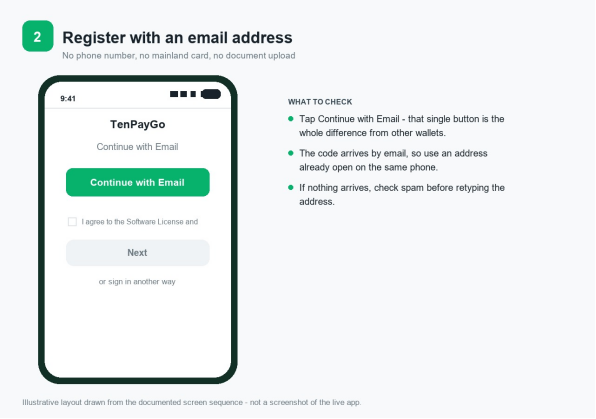
Figure 2 - Continue with Email, the first screen of registration (illustrative layout).

Figure 3 - Enter the emailed verification code, then set a login password (illustrative layout).

Figure 4 - Draw the gesture password: connect at least six dots (illustrative layout).
4. Step Three: Add a Payment Method
With the account live, you land on a page offering three ways to fund payments, and this is where China payment apps either fit your wallet or do not: Bank Card, Apple Pay and E-Wallet. Choose based on what you actually have rather than what sounds easiest. A physical or virtual card in your own name is the most broadly useful. Apple Pay is the fastest to set up, because the card is already on the device and nothing needs typing. A partner overseas wallet suits travellers whose home wallet appears on the in-app list and who would rather keep one fewer app open while abroad.
The bank card route, the most widely supported option across China payment apps, asks for ordinary fields: card number, expiry date, the security code printed on the back of the card, and the card type from a dropdown. Some issuers additionally ask for billing address confirmation, particularly for North American cards. Once submitted, control passes to your own bank, and the verification arrives in their format rather than TenPayGo's - a text message code, a push notification inside your banking app, or a 3-D Secure page. Approve it and the card comes back into the wallet as active.
When binding fails, the fault is almost never the app, whatever people assume about China payment apps before they travel. Work down this list in order. Is the card enabled for overseas or online transactions in your banking app? Is the mobile number your bank holds still yours? Does the billing address you entered match the one on file? Has the issuer's fraud system already declined this as an unfamiliar merchant category? If all four check out and it still refuses, call the number on the back of the card - that call resolves more failed setups than any other action in this guide.
Add two methods if you can, which is the single highest-value thing you can do with China payment apps before leaving home. Two cards from different issuers, or one card plus Apple Pay funded by a different card, costs an extra three minutes and protects you against the most common failure in cross-border payments: your own bank quietly declining a charge for reasons that have nothing to do with China. One method is a single point of failure; two is a plan.
The Apple Pay path is the shortest of the three. Tap Apple Pay, tap Activate Apple Pay, and approve whatever your device asks for - usually a double-press of the side button or a face or fingerprint confirmation. No card number is typed, no expiry date is read out, and the merchant never sees your real card details, because the device handles tokenisation. One thing worth understanding: if your issuer restricts that card for overseas use, the restriction still applies here. Apple Pay changes how the card is presented, not what the issuer permits, and travellers comparing China payment apps often assume the wallet itself has approved the card.
The third path, E-Wallet, hands you over to an app you were already using, which is the arrangement a growing number of China payment apps depend on. Choose your wallet from the list inside TenPayGo, approve the connection in your own wallet app, and come back. Payments then draw on your home balance and settle under your own wallet's rules, which is why two travellers standing side by side can see different fee lines for the same purchase. The list is tied to the app version and grows as more overseas wallets come online, so what shows today is not necessarily what a friend saw last month. Keep a card behind it in any case.
If your home wallet appears in the partner list carried by China payment apps of this kind, remember the list grows as more overseas wallets are connected, and the screen only offers what is live for your app version. Treat it as a convenience rather than a guarantee, and always keep a card behind it. The matching pictures, Figures 5 and 6, show the three-way choice and the card detail form, with the five-point issuer checklist set out alongside as callouts.

Figure 5 - Add a payment method: Bank Card, Apple Pay or E-Wallet (illustrative layout).

Figure 6 - Enter the card details, then approve the verification your bank sends (illustrative layout).
5. Step Four: Paying at the Counter
Every one of the China payment apps described here offers the same two ways to hand money over, and both sit on the opening Pay screen: Scan to Pay and Show Payment Code. With scan, you point the camera at the merchant's printed or screened collection code, the app reads the amount, and you confirm on your own phone. With show code, you present your own rotating payment code and the cashier scans it with their device. Everything else - including which one the person in front of you expects - is settled by local habit rather than by rule.
As a working default when paying with China payment apps in mainland China: restaurants and small shops usually expect you to scan the code on the table card or counter stand, while ticket counters, taxis, convenience stores and busy stalls tend to scan you. Rather than memorising that, hold the phone up with the Pay screen open and let the staff gesture. Within two days you will stop thinking about it, and on day one the gesture is faster than any guessing.
The screen that matters is the confirmation screen, and reading it properly is the whole skill of using China payment apps well. Official product material illustrates this with an order of 100.00 yuan showing an International Card Fee line beneath it, rendered as 0.00 yuan against a struck-through 3.00 yuan - that particular example showing a waived fee. The mechanics behind the line, as published for international card transactions on these wallets, are that a single transaction of 200 yuan or less carries no service fee, while anything above 200 yuan carries a service fee of 3 per cent of the transaction amount. Your own bank may add its own foreign transaction or conversion charge on top, and that one does not appear on this screen at all. Learning to read a single line is worth more than memorising a dozen China payment apps product names.
Once the numbers are right, draw your gesture pattern to authorise, the final step every one of these China payment apps asks of you. The app then shows a success state, the merchant's terminal confirms, and you are done - usually inside four seconds. Every payment and refund lands under Transactions inside the app, which is the page to open if you ever need to reconcile a bill with your card statement, or to show staff proof that a payment went through.
How to read the confirmation screen in four seconds
- Check the merchant name against the shop you are standing in, not just the amount.
- Check the order amount against the number the staff said out loud.
- Check the International Card Fee line - it is the only place the true cost of the transaction is stated.
- Check the currency: the figure is in yuan, not in your home currency.
- If any of the four is wrong, back out and ask the merchant to cancel rather than paying and chasing it later.
Two habits keep this painless once China payment apps become part of your pocket routine. First, keep the app open and signed in before you reach the front of the queue; drawing a pattern under pressure with people waiting is when mistakes happen. Second, do not photograph or share your payment code - it refreshes for a reason, and a screenshot of it handed around a group chat is a genuine risk rather than a theoretical one.
Figure 7 in the image set shows both payment entry points side by side; Figure 8 shows the confirmation layout with the fee line called out. Practise once at home by paying for something trivial - a takeaway coffee in your departure airport, if the app is already usable there - because the first time you do it with your luggage at your feet is not the ideal moment to meet the interface. Running through the sequence once with somebody before departure is the sort of small preparation that separates a smooth first day from a frustrating one.

Figure 7 - Two ways to pay at the counter: scan the merchant code, or show your own (illustrative layout).

Figure 8 - Read the confirmation screen, including the fee line, before you authorise (illustrative layout).
6. When Something Does Not Work
Assume three failure modes with China payment apps, because they account for nearly everything: binding never completed, the payment is declined, or the phone itself cannot do the job. Each has a distinct fix, and running them in the wrong order wastes time.
Binding was covered above, but it earns one more line here because it is the failure China payment apps users meet most often because it presents later too: card issued inside the Chinese mainland, card not enabled for overseas or online use, outdated bank phone number, mismatched billing address, issuer fraud block. Those five, in that order. Calling your bank is not a last resort here - it is usually the fix.
A declined payment at the counter follows a different script, and it is the one that frightens people about China payment apps most. Try your second method first, because that distinguishes an issuer-side block from a merchant-side limit within one attempt: if the second card goes through, the first bank blocked it, and a call later that day resolves it. If both cards fail, the likely causes are a daily ceiling on the merchant's own code, a platform risk control triggered by unfamiliar spending, or simply no network at that spot. Cash settles the moment; diagnosis waits until you have signal.
The phone itself is the third mode, and it has nothing to do with whether China payment apps are working correctly. No data means no code refresh, and no code refresh means no payment, regardless of how healthy the account is. A local SIM or dependable roaming belongs to getting ready to pay, not to a separate shopping list. Battery is the other half of the same problem: a power bank in the daypack and a small amount of cash in your pocket are the two cheapest pieces of redundancy available, and together they cover every version of this failure. None of it requires changing a single China payment apps setting.
Missing signal is the failure that catches China payment apps users out, because the app looks perfectly healthy right up to the moment it has to produce something. A payment code refreshes constantly, and refreshing needs data; with no connection there is no valid code and the scanner simply refuses. Step outside, switch networks, or pay cash - and do not retry repeatedly. If a transaction drops mid-flight, open Transactions and check whether it recorded before you attempt another: guessing at that point is exactly how duplicate charges are created, and unwinding one costs far more than waiting thirty seconds.
Duplicate or partial charges, the worry everyone raises about China payment apps, are rarer than people fear and easier to settle than expected. Check Transactions first. One entry means one payment went through, and any missing confirmation is the merchant's terminal rather than your money. Two entries means you should ask the merchant which one their system took and request a reversal of the other, then follow up through Support with the timestamps from the Transactions page in hand. Anything concerning an amount your bank actually debited, or a card blocked outright, belongs with your issuer rather than with the app's support team.
Refunds run through the merchant, not through you, and every other China payment apps option in this guide behaves the same way. Working out which party owes you the money, in the right order and in the right language, is what human-designed travel support is for while you are still on the road. Ask the merchant to raise the refund in their own system; the money travels back along the original route to whichever card or wallet paid, and how long that takes depends on the merchant, the card network and your issuing bank. The Transactions page shows it once it has been raised. If a merchant agrees to refund and nothing appears, contact them to confirm it was initiated before escalating further.
Two support routes exist for China payment apps of this kind, and knowing which to use saves days. In-app, open Support in the top-left corner, which holds Send Feedback and the User Guide Book, whose footer carries a customer support button - use this for account-specific issues, because it reaches the team with your request already attached. The direct mailbox is tenpaygo_support@tencent.com. Neither will know your issuer's internal fraud rules, so for anything involving a decline, your own bank remains the correct first call.
7. The Other Ways Visitors Pay in China, Kept Simple
TenPayGo is one of several routes through China payment apps, and knowing the others changes how much you depend on it. Deciding which combination suits one particular traveller is a human-designed travel call rather than a product one. What follows is mechanics only - what each route is, who it suits, and what to verify - arranged as a ladder from least setup to most.
The first alternative, and the best starting point in any review of China payment apps, is to install nothing at all. Under the arrangement that lets overseas wallets scan mainland merchant codes directly, users of a supported home wallet open the app they already use and scan the same QR codes everyone else scans. Wallets publicly documented in this arrangement include AlipayHK, WeChat Pay HK, mPay, Kakao Pay, Touch 'n Go eWallet, HiPay, Changi Pay, OCBC Bank, Naver Pay, Toss Pay and TrueMoney, among others, with the supported group having grown to close to 60 wallets from 16 countries and regions by September 2026. If your wallet is on that list, this is the lowest-effort route available to you, and it is worth checking before you install anything, because for some travellers it removes the China payment apps question altogether.
The second is binding your foreign card inside the WeChat app or Alipay instead, the two China payment apps residents actually live in. Those wallets ask for a phone number at registration, which is why they usually come after you buy a local SIM, and they bring the full feature set: ride-hailing, delivery, mini-program bookings. Travellers staying beyond a couple of weeks, or working rather than holidaying, generally end up here eventually even if they start with TenPayGo, adding one more name to the set of China payment apps on the phone.
The third rung of the China payment apps ladder is simply handing over a physical card. UnionPay, Visa, Mastercard, JCB, Diners Club and American Express cards issued outside the mainland work at terminals enabled to read them, which in practice means larger hotels, department stores, airport retail and major attractions rather than noodle shops. Ask before you assume; the terminal either reads it or it does not, and there is no negotiation at the desk.
The fourth, and the one that sits outside China payment apps altogether, is cash drawn from an ATM at the airport or a bank branch. It requires no app, no network and no battery, and it is accepted everywhere. Its two practical limits are logistics - getting notes small enough to be useful - and the carrying limit of 20,000 yuan per person per crossing on RMB banknotes taken in or out of the country.
Rung | Route | Who it suits | Verify before relying on it |
1 | Home wallet scanning mainland codes directly | Your wallet is on the supported list | Your wallet appears in the current list. |
2 | TenPayGo with card, Apple Pay or partner wallet | Short stays, no local SIM yet | Registration opened for your email and the card bound. |
3 | Foreign card bound inside WeChat or Alipay | Longer stays, ride-hailing, delivery | Registration completed with a usable number. |
4 | Physical international card at a terminal | Hotels, department stores, major attractions | The venue's terminal is enabled for foreign cards. |
5 | Cash from an ATM or bank counter | Everywhere, and always | Small denominations are available. |
The rule that makes this useful is independence, and it applies to China payment apps of every kind. Choosing two that suit one particular traveller, rather than defaulting to whichever tool markets loudest, is precisely a human-designed travel judgement. Two routes only count as two if they fail separately: TenPayGo and a foreign card inside WeChat are one rung if they depend on the same issuer, because whatever blocks one blocks both. TenPayGo plus cash is always two. Choose your two accordingly, and the number of situations you cannot pay in drops towards zero.
8. A Two-Method Carrying Plan, and the First Hour After Landing
Everything above about China payment apps compresses into a short schedule, and the schedule exists because every step that can fail fails better at home than at an airport. Two weeks out is for installation and registration. One week out is for cards and issuers. Three days out is for writing down what you set up. Arrival day is for one test purchase through your China payment apps and a cash withdrawal, in that order.
When | Action | Why it sits on that day |
Two weeks out | Install from the official listing, register with email, draw the gesture pattern | Leaves room to fall back to another route if anything stalls. |
Two weeks out | Bind one card, then attach Apple Pay drawing on a second one | Binding depends on your bank, and banks reply at their own pace. |
One week out | Tell card issuers your travel dates | Cuts the chance of a fraud block on your first transaction. |
One week out | Check whether your home wallet scans mainland codes directly | If it does, that is one fewer app to install. |
Three days out | Note down which methods are attached and how support is reached | Usable when you are tired, offline and jet-lagged. |
Arrival day | Make one small purchase at the airport, such as a bottle of water | Turns an assumption into a fact while support is nearby. |
Arrival day | Withdraw cash from an arrivals-hall ATM and ask for small notes | The only guaranteed source of small denominations. |
Every few days | Keep a cash float of roughly 300 to 800 yuan | Covers dead batteries, dead signal and the occasional market stall. |
That first purchase made through your China payment apps matters more than its size suggests. It exercises the whole chain - app, gesture pattern, card, network, issuer, merchant code - in one four-second transaction, in a building with wifi, a help desk and your passport to hand. If it fails there, you have staff and time. If the first test is at a night market ninety minutes away with no signal, the same failure costs you an evening.
The cash half of any China payment apps plan deserves one paragraph, because visitors either over-prepare or skip it. Cash is not a confession of failure and it is not only for emergencies: it is how you pay at places where the person opposite has no terminal, and it is what you use when your phone is flat at the end of a long day. Ask for small denominations specifically when you withdraw, since a wallet of large notes is its own problem in a market, and keep the float somewhere other than your phone case.
Now the honest boundary of any China payment apps guide, stated plainly. This guide can name every screen you will meet and describe what typically goes wrong; it cannot promise that any app will work at any particular counter. Merchants change codes, terminals go offline, issuers decline for invisible reasons, and ceilings exist on accounts for reasons set by someone else. What you control is narrow and reliable: set up at home rather than at the gate, prepare two methods that fail independently, keep usable cash on you, and know the support routes before you need them. Get those four right and payment stops being a topic worth worrying about on your trip.
A note on the images: the step layouts used by Kiki Holidays alongside this China payment apps guide, Figures 1 to 8 are clean UI layouts drawn to match the sequence above, intended as a visual aid rather than as reproductions of the live product. Screens change between builds and between regions, so before publishing, replace them with your own captures from the current version on your own device - screenshotted while connected to wifi at home, with any card numbers and personal details masked. Captured once, they will serve for one app version; the written sequence above is what stays accurate across versions.
Frequently Asked Questions
Q1. Do I need a Chinese bank account to use China payment apps as a visitor?
No. Apps in this category accept cards and wallets issued elsewhere than the Chinese mainland, sign you up by email, and keep no balance for you to load beforehand. The alternatives work identically - your home wallet reading mainland codes directly, or your overseas card attached inside WeChat or Alipay. A mainland bank account only becomes relevant if you plan to hold local funds, which short stays do not require.
Q2. TenPayGo is asking for something this guide does not mention. What should I do?
Read what the field is for before you fill it, because China payment apps change their screens between releases. Screens vary by version and region, and additional verification can be requested for particular functions or higher-value activity. If a request does not match anything described here, do not guess - capture the screen and contact in-app Support or the support mailbox to confirm what it is and why it is being asked.
Q3. Can I register for TenPayGo before I leave home?
Yes, and it is the recommended sequence. The listing is available in app stores across more than 30 countries and regions, so install and register from home, then bind your card while your bank is reachable during its own business hours. Doing it at the departure gate leaves no time for the issuer verification step.
Q4. Why did my card fail to bind?
Work down the five usual causes in order, which account for almost every China payment apps binding failure: the card is not enabled for overseas or online transactions, the phone number on file with your bank is out of date, the billing address entered does not match the bank's record, the issuer's fraud system has flagged an unfamiliar merchant category, or the card was issued inside the Chinese mainland and is not eligible. If the first four check out, ring the telephone number printed on the reverse of the card.
Q5. Is there a fee when China payment apps charge a foreign card?
There can be. The published structure works like this: any single payment of 200 yuan or under is free of the service charge, and anything beyond 200 yuan attracts a charge of 3 per cent applied to the amount. The app shows an International Card Fee line on the confirmation screen before you approve. Your own bank's foreign transaction or conversion charge, if it has one, is separate and does not appear there.
Q6. Should I scan the merchant's code or show them mine?
Either works, and together they are how China payment apps get used at the counter - aim the camera at the merchant's printed code, or bring up your own code for their scanner to read. Nobody expects you to know which applies where; raising the phone and taking the hint from the person serving you is normal, and it becomes instinct within two days.
Q7. My payment was declined but nothing was wrong a minute ago. Why?
Try your second method immediately, the move that resolves most China payment apps failures in one step, because that tells you whether the block sits with your issuer or the merchant. If the second card succeeds, your first bank blocked the charge. If both fail at the same merchant, suspect the merchant's own daily ceiling or missing network coverage. Settle with cash and call the issuer once you have signal.
Q8. How do I get a refund?
Ask the merchant to raise it. The reversal starts on their side and travels back the way it came, to whichever card or wallet paid; the wait is decided by the merchant, the network and the bank behind the card. Check the Transactions page to see it recorded, and confirm with the merchant that it was initiated before escalating to support.
Q9. What happens if I lose my phone or it dies?
This is why any sensible China payment apps carrying plan insists on cash, and why human-designed travel briefings cover it before you board. Your payment code needs both the device and a data connection, so no phone means no payment regardless of account health. Carry a small cash float, carry a power bank, and know that the app will ask for your email and login password on a replacement device before restoring the gesture pattern.
Q10. Can I send money to a friend through these China payment apps?
No. It is built for paying merchants, not for person-to-person transfers: there are no transfers, no red packets and no balance to hold or withdraw. Splitting a bill means one person pays and the others settle it between themselves, usually in cash.
Q11. Do I need a Chinese phone number for China payment apps?
Not for TenPayGo, which registers with an email address, although most other China payment apps ask for one. You do need one for a WeChat or Alipay account, and a local SIM or dependable roaming makes every route work better, because QR payment needs data at the exact moment you pay. Treat mobile data as part of getting ready to pay, not as an unrelated errand.
Q12. How much cash can I bring into China?
Alongside every China payment apps option, the limit on RMB banknotes is 20,000 yuan per person per crossing, in either direction. Beyond that, cash can be obtained after arrival at bank counters, licensed exchange desks, self-service exchange machines and ATMs that read an international card. Ask for small denominations, since large notes are awkward for everyday purchases.
Q13. Is any of this China payment apps guidance financial advice?
No, and it should not be read as such. Every section here explains how a documented option behaves and what typically follows; none of it tells you what to spend or which product to pick. Charges, ceilings, eligibility and where a method is taken are decided by the app, the networks, the merchant and your own bank, and all of them move. Verify figures on the screen in front of you.
Strip any China payment apps guide down and it amounts to four actions: install from the official China payment apps listing, register with email, attach two payment methods that fail independently, and test the whole thing once before you leave home. Visitors who do those four things on a kitchen table rarely think about money again once they land. Visitors who discover the app in an arrivals queue - on airport wifi, with a card their bank has never seen used overseas - spend the first morning of their trip on hold with their issuer instead of at breakfast.
The rest of what this page contains is there for the twenty minutes when something does not behave as described, and closing that gap before you board rather than after you land is what human-designed travel exists to do. It usually resolves in one of five places: the spam folder, your bank's overseas transaction setting, a mistyped billing address, a gesture pattern drawn too hastily, or simply a missing data connection. Knowing those five by name is what turns a blocked payment from a crisis into an errand, and it is the entire difference between reading about how China payment apps work and actually using one.
Sources and Fact-Check Trail
- Weixin Pay launch of TenPayGo for inbound visitors, Qianhai, Shenzhen, 24 September 2026; official product FAQ and user guide circulated by the Weixin Pay team, covering email registration, gesture password setup, supported payment methods, the International Card Fee line on the confirmation screen, and the support channel at tenpaygo_support@tencent.com.
- Official site https://tenpaygo.com; Apple App Store listing id6778755338 published under the seller name Tencent Technology (Shenzhen) Company Limited, iOS version 1.1.2 observed October 2026; Google Play listing reached by searching TenPayGo.
- Ge Wen, head of innovative product experience at Weixin Pay, remarks at the launch media briefing, 24 September 2026, on email-based registration and the design intent, reported by 21st Century Business Herald, Hong Kong Commercial Daily and Yicai Global.
- National Immigration Administration, A Guide to Working and Living in China as Business Expatriates (2024 edition), for the published rule that international card transactions of 200 yuan or less carry no service fee while those above 200 yuan carry a fee of 3 per cent, and for the 20,000 yuan limit on RMB banknotes carried per person per crossing.
- Documented overseas wallets able to scan merchant codes in the Chinese mainland, including AlipayHK, WeChat Pay HK, mPay, Kakao Pay, Touch 'n Go eWallet, HiPay, Changi Pay, OCBC Bank, Naver Pay, Toss Pay and TrueMoney, per the same guide; Weixin Pay stated in September 2026 that close to 60 wallets from 16 countries and regions were supported.


Comments